
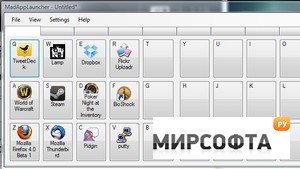
MadAppLauncher is a simple application launcher. Group applications, folders, scripts, etc. with ease. It supports drag and drop and manual editing. There is no need to remember all those hot keys; just activate the application launcher, press one number key to select a tab(group) and another key(letter/symbol) to launch the corresponding application. Features: Assign 30 programs for each of the 10 tab pages. A total of 300 per configuration Press a key to find a program; 0-9 to activate tabs and the corresponding letter/symbol to launch a program. Organize better by assigning a configuration file to a button - effectively creating a cascading set of programs Option to keep the application launcher window on top of all other windows Option to auto-hide the application launcher window when an application, file, or folder is opened Option to always center the application launcher on screen Option to change the hotkey used to activate the application launcher Drag and Drop applications, files, and folders Check for updates on startup Option to change an application\'s initial window size and location Save multiple sets of applications Run programs as administrator Duplicate applications assigned to buttons Move buttons across tabs Auto activate tabs on mouse over Option to press a key twice before launching Refresh icons for portable applications, files, and folders Auto-save data files Support for the visually impaired (English only) Support for international keyboard layouts Favorites bar Mouse wheel support for tab navigation Custom targets besides files and folders are supported Use of left and right arrow keys to select tabs
Скачать