
Описание
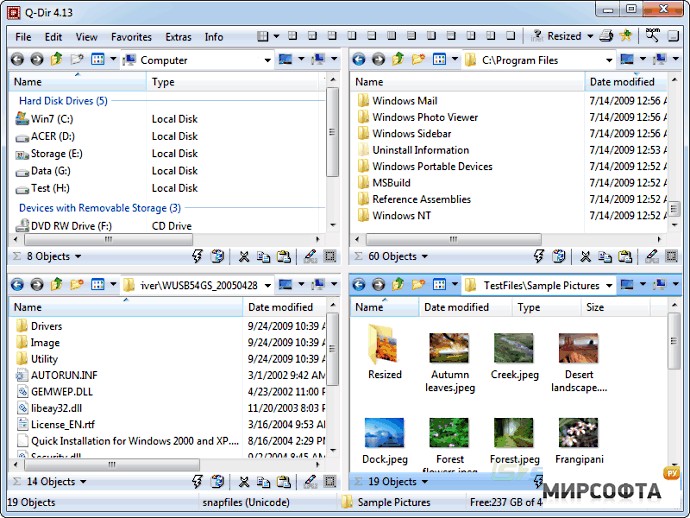
Q-Dir makes your files and folders easy to manage. Fast and easy access, with an amazing Quadro-View technique. You donТ‘t have to renounce the usual, Drag and Drop, all Views, and other functions of your system. No! Q-Dir gives you other nice functions, that make you happy. One can save many hand moves and also time! Q-Dir does not have to be installed and can be executed easily from the desktop. Rename Q-Dir_Installer.exe to Q-Dir.exe and GO. ItТ‘s a small famous utility for Windows PC-s and also an USB-stick friend :). Features: • Favorites: - Quick access to most often used folders. • Drag&Drop: - Move files by dragging in Q-views, and other programs such as MS Explorer. • Clipboard: - Copy/ Paste between the Q-Dir directory views, and other programs such as MS Explorer. • Folder-Type: - ZIP-, FTP-,cabinet-,network-, system - folders, shortcuts ... • Views: - Large icons, tiles, list, detail, thumbnail (Vista: extra large symbols) . • Export: - to XLS, CSV, TXT, HTML. • Popup Menus: - Desktop, My Computer. • Screen magnifier: - anything on the screen can be enlarged. Color Filter: - Different colors for different item types (e.g. *.log;*.txt). • Highlight-Filter: - Effective way for fast items highlighting. • File-Filter: - Allows for quick and easy filtering of the items. • Columns: - All columns support, and save function . • Quick-LinkТ‘s: - For fast folder access. • Folder-Select: - Fast & flexible folder selection address-bar/ desktop menu/ my-computer menu/... • Multi-INI: - Several INI files for Q-Dir. • Tree-View: - Simple and quadruple. • Preview: - Allows a quick preview. • Portable: - from 2.77 is Q-Dir portable. • And ... WhatТ‘s New in version 3.19 • Delete the Start.qdr at Q-Dir crash. • More space for data, address bar either 1x or 4x or no • No crash at various removable storage media! • Small optimization and bugs WhatТ‘s New in version 3.17 • Optimization especially in the memory usage in prolonged use. • Treeview: adjustable auto expand drag over time. • Singel panel mode for small screens. WhatТ‘s New in version 3.16 • Corrections in the launch window positioning of Q-Dir. • Some of Vista bugs trod. • Better Path interpretation in the address bar, and support the environment variables "%temp%,%appdate%,%AppData%,%UserProfile%,..." WhatТ‘s New in version 3.15 • Corrections and improvements in the microscope. • Optional display of directory or name in the title bar. • View updated when enable/disable the file filter. • Better optics under flat-Design. • Renaming on Shell Context-Menu in the Tree-View. • Preview and ceneral optimization. WhatТ‘s New in version 3.13 • Support for the mouse XButtons Previous and Next navigation. • Network access in the tree-view improved and accelerated. • Auto update problem in the tree-view for zip folders and network is fixed. • PDF preview is possible when Adobe Acrobat Reader >7.0 is installed. • Optimization stories. WhatТ‘s New in version 3.11 • Driver name change in the tree view is possible, also Т‘UNDOТ‘ last rename command. • Auto update correction in the tree-view, improvement for List-View. • Start error message suppression: removable media or unreachable/deleted folders! • Shell menu display the full folder path in the status bar. WhatТ‘s New in version 3.09 • Direct rename in the Tree-View is possible, also copy/paste/cut [Ctrl] + C V X. • Two views more 2 & 3 rotated. • Small size optimization. WhatТ‘s New in version 3.07 • Speed-Optimizing in color filters for larger directories. • Optional activation of colors or bold font for the tree viewТ‘s. • Font size corrections in the display (accwiz.exe). WhatТ‘s New in version 3.05 • Corrections: Popup-Menue, Tree-View scan for subfolder,Color-Filter WhatТ‘s New in version 3.03 • File filters corrections. • Color filter correction . • Marking filter corrections. • Tree-view corrections. • The view-settings will be saved in the INI. For portable also everything else. • Q-Dir is 100% portable. • Optimization and fine-tuning;). WhatТ‘s New in version 2.99 • English translation. • View transferor right mouse button on the Q-Icon. • Quick Links folder problem resolved • Portable Install corrections. • ALT + LEFT / RIGHT = Back / Forward navigation. • The marker filter can be used as file filter • Unicode version: support of Asian, Arabic, Hebrew, ... Writings. • Speed and other optimization;).